Showing posts with label PC. Show all posts

Saturday, 25 July 2015

New PC Build - Planning Phase

It's that time of year again, when the Tax Return fairy visits and leaves a giant wad of cold hard cash in your bank account. I got lucky this year starting a new job and not quite hitting a certain tax bracket before the end of the financial year ended, so my tax return will come out to just shy of $5,400 this time around.

Since my PC is about 5 years old and I bought it initially at Harvey Norman (so it's probably even older than that, especially since it was the floor model :/ ), it's about time to upgrade! :D

So many parts to choose from!
Since I still have to wait about 2 weeks before the Tax Fairy visits my particular bank account, I've been looking for a list of parts that will work best for me. I'll be updating with progress on the build as parts arrive, but it's likely they may all arrive at once anyway.

Initially, I decided to go all out and spend as much on graphics power as I could, but it quickly became an expensive list and the rest of the parts suffered as a result. The final list I've come up with is a good balance of power and affordability, specifically focussing on making sure that my upgrade path is as wide as possible in the future.

The Case - $150 (Recycled)

The Cooler Master HAF XB EVO case is a different case than you would normally get. It manages to be a great gaming case by providing space for the largest graphics cards and plenty of options, yet somehow also functioning well as a test-bench case by providing quick access to parts through three removable panels and a motherboard tray.

I bought it a little while back and it should serve fine as a shell for the new components, so I can save some cash by not fixing what isn't broken here.


The Power Supply - $149 (Recycled)

The Cougar CMX1000 V3 1000W 80 PLUS Bronze Modular Power Supply is nothing particularly special. It was the cheapest power supply that I could find above 1000W. I can always upgrade this later if I end up getting more power hungry components, but at least it's a modular power supply so there won't be a mess of unused power cables dangling inside the case.

Also, it has a switch...
Frankly, I'm surprised you can still purchase power supplies that don't have one by default...


The Motherboard - $759

The MSI X99A GODLIKE Gaming RGB Motherboard is the best x99 motherboard for the 2011-3 series of CPUs that I could find. My reasoning is that you need to have the best motherboard you can get in order to make sure you can upgrade for a long time without having to swap it out in the future. The rugged looking armour, built in wireless, bluetooth and high quality audio would be enough to sell me, but there's also a cool RGB lighting system that resembles those found in modern keyboards and it has the ability to expand all the way to 4 way SLI in the future, should I want to go to that extreme.

The CPU - $539

I chose the least powerful of the i7 CPUs available for the 2011-3 socket, the Intel Core i7 5820K, simply to lower the price of the overall build, but for the extra 2 cores it didn't really seem worth another $1000 to get the Intel Core i7 5960X Extreme Edition. Especially since the clock speed is the same anyway.
Should they release more powerful CPUs for the 2011-3 socket, I can always upgrade anyway.


CPU Cooler - $89
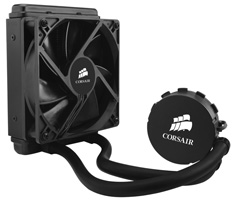
Since this is my first self-assembled PC, I've decided that a full water cooling system would be a bit too risky. Instead, I opted for the Corsair Hydro Series H55 CPU Cooler enclosed water cooling loop for just the CPU until I have a better understanding of what I'm doing.

This should allow me to test the added benefits of water cooling without altering my graphics card/s or risking water getting in the components when putting it together. 


The RAM - $490

The number one reason that I didn't pass my Information Technology course was helping other students or playing games when I should have been more focussed on my own work.

Close second, however, was the fact that I could never run a virtual machine of Windows 8 Server Edition to do a majority of my work at home because my computer only has 8GB of ram. 

This would be fine for most people, but when you're running a virtual machine that needs a bare minimum of 4GB or higher to run faster than a crawl, your own operating system, and perhaps you need a client virtual machine to test your work... Well, you can see why RAM has taken such a priority for me this time around.

I was actually hoping to get the 128GB kit of ram (8 x 16GB sticks), but the overall budget decided on 2 sets of G.Skill Ripjaws 4 F4-2400C15Q-16GRR 16GB (4x4GB) DDR4 instead, for a total of 32GB.

The Graphics Card - $1089

The MSI GeForce GTX 980 Ti Gaming 6GB was a design choice mostly. You may have noticed that the majority of the parts I've decided on are MSI or red. I decided to go with an MSI GTX 980 Ti instead of a Gigabyte GTX 980 Ti, which has a higher clock speed, simply because it matches both my MSI motherboard and the secondhand GPU I'm testing Phys-X with. The RAM just happened to be red even though I chose the cheapest RAM available.

With an almost identical card to the Titan-X, this seemed like the logical choice since I can get roughly the same performance for 2/3 the price.

The Phys-X GPU - $519 $350 (second-hand)

Initially, I had decided just to get a single GPU, but a friend of mine is upgrading to a Titan X, so I'm getting my hands on a MSI GeForce GTX 970 Gaming 4GB for considerably less than the retail price, even though he hasn't had it all that long.

This was going to be my primary GPU for a while, however another friend told me that you could have two mis-matched GPUs from the same manufacturer (Nvidia/AMD) and set one to take over all the physics calculations by allocating it as a Phys-X card instead. This pulls the physics processing away from both your primary graphics card and CPU, and thus should provide a noticable performance boost.

I haven't tried this before and my current GPU is AMD, so this secondhand GPU seemed like a perfect fit, both thematically with the rest of the build, and to provide a dedicated Phys-X solution. Should be fun to experiment with :3

Storage Drives - $350 (some recycled drives)

So I'm splurging a little bit and getting an 8TB archive drive from Seagate, since I keep filling mine at LAN parties, but I already have a 128GB SSD and a 1TB hard drive to use as my primary and secondary drives, so I'm not spending a great deal on new active drives.

Since I'm also getting a capture card, this will provide a good place to stick raw footage until I get a chance to edit it and produce a YouTube video from it.


Additional Case Fans - $39

Grabbed myself a new 120mm fan since my existing one has blue LEDs and I got myself a 200mm fan for the top panel of my case and two 80mm fans to go behind the hard drive rack.

Blue LEDs don't really mix with the existing theme of red, so the new fans are all black as much as possible.


Mouse - $79

Originally, I wanted to get a Razer Naga, however after recently purchasing it and giving it a try, I realise that the grid of 12 buttons for your thumb is actually really poorly designed for general computer use. The grid is over the space where you would typically put your thumb when you lift the mouse to turn around in an fps and would often cause mis-pressed keys and just wasn't really useful for me. 

The Corsair Vengeance M95, however has the area where you would normally place your thumb free and places a similar number of buttons around the thumb space in what seems like a much better thought out design. It should be cool to use with macro keys and stuff :3

Keypad - $135

I've had my eye on getting a dedicated gaming keypad for a while now. Mostly it's because I love the feeling and sound of a mechanical keypress for gaming, however when I'm typing I like a quiet keyboard.

My current keyboard is not super noisy, so the Razer Orbweaver 2014 should be good for gaming sessions.


I also grabbed a PC toolkit and a USB drive and a few other items, so the total came to just under $3,645 plus $45 postage.

Keep an eye out for my next post when I'll be unboxing and assembling each part :3

Let me know in the comments if you have any suggestions or improvements.


*EDIT*

Since this post, I have also purchased a Logitech G710+ Keyboard, a professional recording microphone and a 28 inch 4k Monitor, so most of my tax return is now spent...

I'm kinda bad with money :/

But, that does mean more cool things to play with! :D \o/

Monday, 20 July 2015

The Stanley Parable - Review

I've been playing The Stanley Parable over my birthday. I have played it over, and over, and over again... you may ask, why would I play the same game over and over? Well in The Stanley Parable, it's kind of the point.


You play as a everyday worker called Stanley. Stanley works in an office building at a computer terminal in room 427. He is given commands on his monitor. These commands tell him which buttons to press and for how long. One day he finds all his coworkers gone. Where did they go? Maybe Stanley missed a memo. From here, Stanley's fate is in your hands. Will you follow The Narrators instructions or will you destroy the game he spent so long making? Maybe you will help him test out a new game he is making.


When I first started playing The Stanley Parable, I thought it would be a puzzle game. From the trailer I knew it would restart again and again with slight changes so I assumed I would be finding the things that made those small changes in order to reach a final ending. I spent time and time again doing slightly different things, taking notes of numbers to access codes and paying close attention to the small things.

It took me some time but I soon realised this was not a puzzle game. This was an adventure game. Maybe an art game. I'm still unsure. The Stanley Parable has multiple endings. In fact the point of the game is to find all the endings. There is no right or wrong way to go. Follow the narrator's... well narrations... or don't. Its really up to you.

The Stanley Parable is full of comedy. The humor reminded me of Portal's humor. The narrator basically tells the story but as time goes on he can get a little annoyed or frustrated at you not doing as he says. I had a real laugh when I went into the broom closet in two games and on the second time he said "Oh not this again.". The 3rd time around the broom closet was boarded up to prevent me from going in there.


I do like this game a lot, however, I like games with a little more... I don't know... direction I guess. I wanted to actually have a true ending I was aiming for. I loved the idea of starting again and again with slight changes. I suppose I expected The Stanley Parable to be a puzzle game so I went into it, trying to "complete" the game. But there is no true ending. Its just lots of different endings.

So how do I rate this game.

Graphics: 6 / 10: I don't really know what to write about them. they were okay.
Music: N/A - There wasn't really any music. Except in the... other game part (without giving too much away)
Story: 8/10 - This was an interesting story because is was every changing. Is the narrator bad or good? The comedy in the story is what really made it.
Gameplay: 8/10 -The gameplay was fun. It is fun trying to find different ways to change the story.

Overall: 7.3 / 10

An interesting and funny game. Gets you addicted for a few hours but you don't know why?

Monday, 13 July 2015

Ori and the Blind Forest - Review

Well I finally did it, I finished Ori and the Blind Forest. There were happy times, there were sad times and there were times I wanted to throw my keyboard across the room. But it is done.


Now normally I don't have much expectations for arty games. I have played my fair share of them and have found that a majority of them are just that... arty. The developers want to make something very artful and they do. Looking upon them in that perspective, they succeed. Limbo is one of those games. Yes it has some challenges and the gameplay is so so. I enjoyed it. I really did. But a game needs more than a few minutes of play. I found Limbo lacked bulk. It was over before it really began.

Now I was worried about this when starting to play Ori. Bel got this game because she likes pretty games and, well look at it, Ori is beautiful.


But unlike a lot of pretty games that is not all. You play as a little creature who is trying to bring balance back into the world. He is the last of his kind as all others have died off. You must go to all corners of the world and restore the elements.

The game itself has really good gameplay. The controls are smooth, and there are so many different kinds of movements. Some are locked at the beginning. As you kill enemies you get experience which fills up a bar. When the bar is filled you get an upgrade point. These upgrade points can be used to give Ori a new ability for a full ability tree.


The abilities in the ability tree are not required but really do help out. You also get skills through the world. These are all required to progress in the game.


Now the game isn't small either. The world map is a lot bigger than some pretty games I have played. Okay lets be honest, its bigger than ALL pretty games I've played.


The red arrow I have drawn is where this next image is...


When you get to restoring the elements in each area it is not an easy task. They took me a lot of turns before getting them right. I won't go into what is required because that may be a spoiler.

So my score for this game...

Graphics: 10/10 - These are some of the most beautiful graphics I have ever seen.
Music: 10/10 - The Music paints the mood for the game so well.
Story: 8/10 - I have had better stories but this is a good one. It pulls the emotion strings and has twists and turns.
Gameplay: 9/10 - I would have given this game 10/10 but when I completed the game I couldn't continue to play. It should have offered me to start again with a harder setting or something.

Overall: 9.25/10

 Well Done Microsoft. This game was worth every penny spent.

Saturday, 27 June 2015

Messing around with Skyrim Mods

For the best part of the last week, I've been in mod-hunting mode for The Elder Scrolls V: Skrrim. I eventually bogged my game down to the point where it was unstable and I could barely play it, but it was fun whilst it lasted :3

Here's a few of my favorite moments.

The moment I realised that fire magic starts actual spreading fires thanks to the Ice and Fire overhaul mod. D:


The Tropical Skyrim mod makes the entire game look super cool and warm :3

Ridable Husky Mounts! "Mush!" :D

Everything looks lush and green with Tropical Skyrim on. I love it :3
I wish I'd been able to get a full playthrough out of it or at least completed a few acheivements, but after roughly 100+ mods installed, it just gets rediculously laggy and crashes quite often. I might try again and remove some of the mods to increase stability. Tropical Skyrim will probably have to go as it adds a ton of foliage and reduces performance significantly but hopefully I can kep some of the other sillier mods :3

Friday, 12 June 2015

No Love For PC In Black Ops 3


Since I heard that Black Ops 3 was being released I have been on the search for a server browser within the game. Day after day I Google it. I want to play CoD but what's the point in buying a game that will lack players in less than a year.

The PCdev recently made a tweet which gave a lot of the PC community hope.
However as I mentioned in a previous post, the term dedicated servers is misunderstood. Black Ops 1 and 2 had dedicated servers in all ranked matches. As does Ghost & Advanced Warfare. However the only one that had a server browser was Black Ops 1. Dedicated servers means there is an actual server that the game is played in rather then the game being hosted on one of the players PCs.

You may notice that when playing zombies in Black Ops 1, when the host left, the game ended. This is because there was not a dedicated server but the game was hosted on the host's computer. However with the ranked multiplayer matches the server would remain there even if all players left. This is dedicated servers.

Now I recently watched the video below on YouTube. This explains a different use of a matchmaking system to not put you back in the same server if you leave that server. Matchmaking equals no server browser.


So once again, this year's Call of Duty (or as Vanellope Von Schweetz would say Call of Doody, which I think is quite fitting for the PC gamers) is another Call of Duty I will not be getting and I think is my last Call of Duty I will look at.


Friday, 5 June 2015

Get The Most From Steam


Recently I have found a few things that Steam can do that is really cool and I wanted to share them with you.

1) Game Sharing: I was playing on my account on Bel's computer when I noticed at the bottom of my library: "Bellistik's Games" and a list of her games. I decided to click on one I knew was installed and see what happened. A request was sent to Bel's account asking her permission for me to share her games on her computer. I logged into her account and accepted the request. I was then able to play her games, on my account. Now this was cool enough but what made it better, the game was treated as though it was my game. I didn't have to play her game. So now, I have in my library, ALL of her games and ALL of mine.

2) Game Streaming: Today I saw Bel's games again but this time on my computer. Once again I decided to try and play it but this time, play was replaced with stream, so I clicked stream. Her game then loaded on my PC. And I was able to play it. Now I want to point out that my lappy is not good enough to play some of the games but this time I was able to play. I looked at Bel's computer and steam had given me control with my keyboard and mouse.

3) Download without using bandwidth: As previous mentioned by Lloyd, you can set up steam to download your games from freezone servers only. I won't go into this as Lloyd already wrote a post about it. If interested in this you can read the original post here.

4) Remote Downloading: Damn I forgot to set that game to download and I'm out on the town. Well you can log into your account via the webpage and start a download from there. Then when you get home your game will be ready and waiting for you.

And these are the things I have found which I didn't know myself. Now you can get more out of Steam :D

Friday, 22 May 2015

Tech Tip - Free Steam Downloads Bandwidth


If you're like me, you've often run over your monthly allowance of data because you bought a few too many games through steam that week and been restricted down to dial-up speeds until the month rolls over. (That's if you live in the stone age, like most of us Australians do)

Now most internet providers have certain content that they call the "freezone" or something similar, where anything you download is not counted towards your monthly limit. Some companies, like iiNet, have Steam servers set up that run inside this Freezone network. You can make use of these servers using the steam settings, but ultimately that just sets a preferred server. Steam can still download through a metered server if the unmetered server is busy or doesn't have the content you're after.

I have found a piece of software that allows me to download most things off steam without them touching my monthly allowance of data whatsoever. It's called Steam Limiter and it blocks steam from connecting to any download servers that are not within the Freezone for your ISP. This effectively forces Steam to run only through servers that are not counted towards your monthly allowance of data.

Now there are a few small drawbacks. I have noticed that some content is not available from these freezone servers, so occasionally I have to disable it to install a game, but it happens very infrequently. The software's benefits also depend on your Internet Service Provider having a Freezone Steam server. So if you are with an ISP that doesn't provide one, you're out of luck :/

All in all, it's a very useful piece of software and it has stopped the majority of complaints from my housemates about the data always running out each month, so it has served it's purpose for me. Your mileage will vary, but I highly recommend trying it and seeing if there's a noticeable decrease in your monthly data usage :3